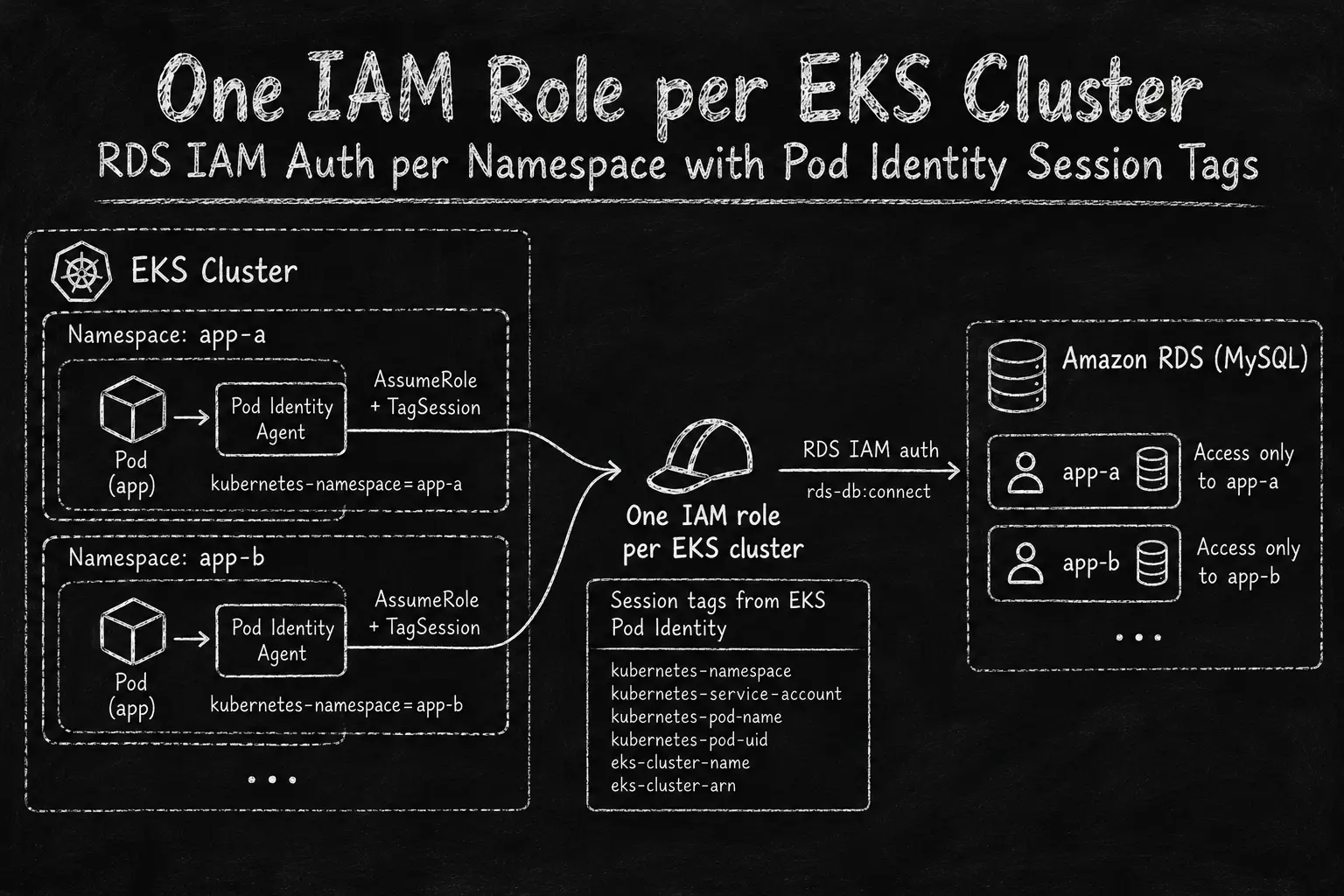
If you are running the same application for many tenants in Kubernetes, most likely you deploy a separate copy of it for each tenant, in its own namespace. In this post I call each copy an app. All apps run the same code and need the same access. The only difference is the name: the database user, the S3 prefix, the parameter path and so on.
Every app needs its own RDS user and password. It is fine when you have up to 10 apps. If you have more, you need a procedure to rotate the passwords, and managing all of that is overcomplicated.
RDS IAM authentication removes the passwords, but it moves the problem to IAM. With one IAM role per app, every new app needs a new role, a new policy and a new trust relationship. All these policies are the same, only the database user name is different. With several clusters, it is apps multiplied by clusters. Managing that many IAM roles can be tricky as well.
So what if I tell you that ABAC can solve this issue, and you can use a single role to access RDS?
EKS Pod Identity adds session tags to every role session it creates. One of them is kubernetes-namespace. If the database user name is the same as the namespace name, one policy can say “a pod can connect only as the database user with the same name as its namespace”. So one role per cluster is enough.
We hit this when we started to move our PHP apps from IRSA to EKS Pod Identity, and from database passwords to RDS IAM auth. I did a small proof of concept on a test cluster to check that it really works. Below is the setup, the results and the gotchas I hit on the way.
I already used ABAC with principal tags for RDS IAM auth in Identity-Driven Access to Internal Resources Using AWS SSM . There the tag came from IAM Identity Center. Here it comes from EKS.
How it works
  ---
config:
  htmlLabels: false
  flowchart:
    nodeSpacing: 40
    rankSpacing: 40
    padding: 14
    wrappingWidth: 320
  themeVariables:
    fontSize: "16px"
---
flowchart TD
    subgraph K8S["EKS cluster"]
        PB["Pod in namespace app-b"] --> AG["Pod Identity Agent"]
        PA["Pod in namespace app-a"] --> AG
    end
    AG -->|"AssumeRoleForPodIdentity"| EKS["EKS Auth"]
    ROLE["One IAM role per cluster"]:::accent
    EKS -->|"AssumeRole + TagSession"| ROLE
    ROLE --> S1["Session tag
kubernetes-namespace=app-a"]
    ROLE --> S2["Session tag
kubernetes-namespace=app-b"]
    S1 -->|"connect as app-a"| RDS[("RDS MySQL")]
    S2 -->|"connect as app-b"| RDS
Every pod in the cluster that has a Pod Identity association gets credentials for the same role. The difference is in the session tags. EKS adds them when it assumes the role, so the pod can’t change them.
EKS Pod Identity adds six tags :
eks-cluster-arneks-cluster-namekubernetes-namespacekubernetes-service-accountkubernetes-pod-namekubernetes-pod-uid
All of them are transitive, so they also follow the session if the workload chains into another role.
The IAM policy uses ${aws:PrincipalTag/kubernetes-namespace} as the database user name in the rds-db:connect resource ARN. A pod in namespace app-a can generate a token for any user, but RDS accepts it only for user app-a.
The design depends on one convention. The database user name must be the same as the Kubernetes namespace name.
Trust policy
This is the standard Pod Identity trust policy:
{
  "Version": "2012-10-17",
  "Statement": [
    {
      "Sid": "AllowEksAuthToAssumeRoleForPodIdentity",
      "Effect": "Allow",
      "Principal": {
        "Service": "pods.eks.amazonaws.com"
      },
      "Action": [
        "sts:AssumeRole",
        "sts:TagSession"
      ]
    }
  ]
}
sts:TagSession is required. Without it, EKS can’t add the session tags and the whole idea doesn’t work.
Permission policy
{
  "Version": "2012-10-17",
  "Statement": [
    {
      "Sid": "ConnectAsNamespaceDbUser",
      "Effect": "Allow",
      "Action": "rds-db:connect",
      "Resource": "arn:aws:rds-db:<region>:<account-id>:dbuser:<cluster-resource-id>/${aws:PrincipalTag/kubernetes-namespace}",
      "Condition": {
        "StringEquals": {
          "aws:PrincipalTag/eks-cluster-name": "<cluster-name>"
        }
      }
    }
  ]
}
<cluster-resource-id> is the RDS resource ID (cluster-XXXX for Aurora, db-XXXX for an instance), not the cluster name.
The Version element is not optional here. Without 2012-10-17, IAM treats ${aws:PrincipalTag/...} as a literal string.
The eks-cluster-name condition is there because IAM roles are global for the account. Without it, any other cluster in the same account with a Pod Identity association to this role and a matching namespace name would get the same access.
Database users
The database user is a normal IAM auth user. Its name must be the namespace name:
CREATE USER 'app-a'@'%' IDENTIFIED WITH AWSAuthenticationPlugin AS 'RDS';
GRANT SELECT, INSERT, UPDATE, DELETE ON app_a.* TO 'app-a'@'%';
Namespace names often have hyphens, so the user name needs quotes in SQL.
Pod Identity association
The role is shared, but each namespace still needs its own association:
aws eks create-pod-identity-association \
  --cluster-name "$CLUSTER_NAME" \
  --namespace app-a \
  --service-account app \
  --role-arn "arn:aws:iam::<account-id>:role/<cluster-name>-rds-iam-auth"
So the number of associations still grows with the number of apps. The difference is that an association is a small EKS object. It doesn’t need a new role, policy or trust policy, and it doesn’t need an IAM change each time.
Test
The test pod generates a token and connects with the MySQL client:
TOKEN=$(aws rds generate-db-auth-token \
  --hostname "$DB_HOST" \
  --port 3306 \
  --username "$DB_USER" \
  --region "$AWS_REGION")

mysql --host="$DB_HOST" --port=3306 --user="$DB_USER" \
  --password="$TOKEN" \
  --enable-cleartext-plugin \
  --ssl-ca=/certs/global-bundle.pem \
  -e "SELECT CURRENT_USER();"
I created one database user, app-a, and two namespaces, app-a and app-b. Both namespaces used the same role and the same policy.
| Namespace | DB user | Result |
|---|---|---|
app-a | app-a | Connected, CURRENT_USER() = app-a@% |
app-b | app-a | ERROR 1045 (28000): Access denied for user 'app-a'@'<pod-ip>' |
The pod in app-b has a valid session for the same role, but its kubernetes-namespace tag is app-b. The policy resource resolves to dbuser:<cluster-resource-id>/app-b, so connect as app-a is denied.
Two more cases I didn’t run separately, but they follow from how IAM works:
- Database user
app-bexists. The pod inapp-bmust connect asapp-b, and the pod inapp-amust get1045for that user. This is the same policy with a different tag value. - Session tags are disabled on the association (
--disable-session-tags). Then the tag is not in the request context, and a resource with a policy variable that has no value doesn’t match any resource . Theeks-cluster-namecondition also fails. So the result is an implicit deny.
Proof in CloudTrail
I wanted to see the tags, not only the result. RDS IAM auth itself is not logged in CloudTrail , but the STS side is.
The first event to look at is AssumeRoleForPodIdentity, but it doesn’t help. It has responseElements: null and the service account token is hidden, so there is no namespace in it. The tags are in the STS AssumeRole event that EKS makes for the role, with invokedBy: pods.eks.amazonaws.com:
aws cloudtrail lookup-events \
  --lookup-attributes AttributeKey=EventName,AttributeValue=AssumeRole \
  --start-time "$(date -u -v-1H +%Y-%m-%dT%H:%M:%SZ)" \
  --query 'Events[].CloudTrailEvent' --output json \
  | jq -r '.[] | fromjson
      | select(.userIdentity.invokedBy == "pods.eks.amazonaws.com")
      | select(.requestParameters.roleArn | endswith("<role-name>"))
      | [.eventTime, (.requestParameters.tags[] | select(.key == "kubernetes-namespace") | .value)]
      | @tsv'
date -v-1H is the macOS syntax. On Linux use date -u -d '1 hour ago' ....
In my test there were two events, one with kubernetes-namespace=app-a and one with kubernetes-namespace=app-b. Both had all six tags in transitiveTagKeys.
Gotchas
generate-db-auth-token always succeeds. It is local SigV4 signing without an API call. RDS checks IAM only when you connect. So a deny is not an AWS error. It is MySQL ERROR 1045. That looks like a wrong password or a missing user, so check the IAM side too.
IRSA wins over Pod Identity. If the service account still has the eks.amazonaws.com/role-arn annotation, the SDK uses IRSA credentials first. IRSA sessions have no Pod Identity tags, so the policy doesn’t match. Remove the annotation when you migrate.
Create the association before the pod. The Pod Identity webhook adds the environment variables only when the pod starts. If the pod was already running, restart it.
Escape the policy variable in a shell heredoc. In a heredoc without quotes, ${aws:PrincipalTag/kubernetes-namespace} looks like a shell variable and the shell removes it. Use \${aws:PrincipalTag/...} or a quoted heredoc (<<'EOF'). Check the policy in IAM after you create it.
Session policies and session tags don’t mix. A Pod Identity association can have its own session --policy, but this requires disableSessionTags to be true
. So you can’t use a session policy with this pattern.
Tags make the token bigger. The RDS auth token size depends on the number of IAM tags and other things. It is about 1 KB at minimum. Make sure the database driver doesn’t cut the password.
Trust boundary
The boundary here is the namespace. Any pod in app-a with an association to this role can connect as app-a. For most of our apps that is fine, because one namespace is one app.
If you need it narrower, there are a few options:
- Use
kubernetes-service-accountin the resource, for exampledbuser:<cluster-resource-id>/${aws:PrincipalTag/kubernetes-namespace}-${aws:PrincipalTag/kubernetes-service-account}. Then the database user name convention changes too. - Add a condition on
aws:PrincipalTag/kubernetes-service-account. - Restrict the trust policy with
aws:RequestTag/...conditions. The EKS docs have an example for namespace and service account. The same works withaws:RequestTag/eks-cluster-arnif you want the trust policy itself to accept only one cluster.
eks-cluster-name is unique only within a region. If you have clusters with the same name in different regions in one account, use eks-cluster-arn in the condition.
Not verified yet
The PoC proves the access model. Some things for production I didn’t check yet:
- Token lifetime. The token is valid for 15 minutes, and RDS checks it only when it opens a connection. An open connection stays open after the token expires. With PHP-FPM and persistent connections it should be fine, but every new connection needs a fresh token.
- Connection rate. Every new connection does an IAM check on the database side. AWS also says IAM auth needs 300 to 1000 MiB extra memory on the instance. For apps that open many short connections, test it under load.
- SDK version. Pod Identity needs a recent SDK. For the AWS SDK for PHP the minimum is 3.287.1.
- Other services. In theory the same pattern works for anything that accepts policy variables in the resource, like S3 prefixes, Secrets Manager paths or SSM parameters. I tested only RDS.
What is next
The role and the policy are created once per cluster, but the Pod Identity association is still required for every namespace. The association needs the exact namespace and service account name. You can’t use a wildcard, so there is no way to say “all namespaces in this cluster can use this role”. Without an association, the pod doesn’t get any credentials, and the policy is never evaluated.
So every new app still needs one more step outside of Kubernetes. I don’t want this to be a manual step or a separate Terraform change for each app.
The next thing I want to try is AWS Controllers for Kubernetes (ACK)
with the EKS controller. It has a PodIdentityAssociation
resource, so the association can be a part of the app Helm chart:
apiVersion: eks.services.k8s.aws/v1alpha1
kind: PodIdentityAssociation
metadata:
  name: app
  namespace: app-a
spec:
  clusterName: <cluster-name>
  namespace: app-a
  serviceAccount: app
  roleARN: arn:aws:iam::<account-id>:role/<cluster-name>-rds-iam-auth
Conclusion
With EKS Pod Identity session tags, one IAM role and one policy per cluster are enough for RDS IAM auth for all apps. There are no database passwords to rotate, and a new app doesn’t need any IAM changes. It needs only a database user and a Pod Identity association.
The PoC shows that the isolation works. A pod can connect only as the database user with the same name as its namespace, and CloudTrail shows which namespace each session was for. The only rule the teams must follow is the naming convention: the database user name is the same as the namespace name.
References
- Grant Pods access to AWS resources based on tags (EKS Pod Identity ABAC)
- Create IAM role with trust policy required by EKS Pod Identity
- IAM policy elements: Variables and tags
- IAM database authentication for MariaDB, MySQL, and PostgreSQL
- Creating and using an IAM policy for IAM database access
- AWS CLI: update-pod-identity-association
- AWS Controllers for Kubernetes (ACK)
- ACK EKS controller: PodIdentityAssociation