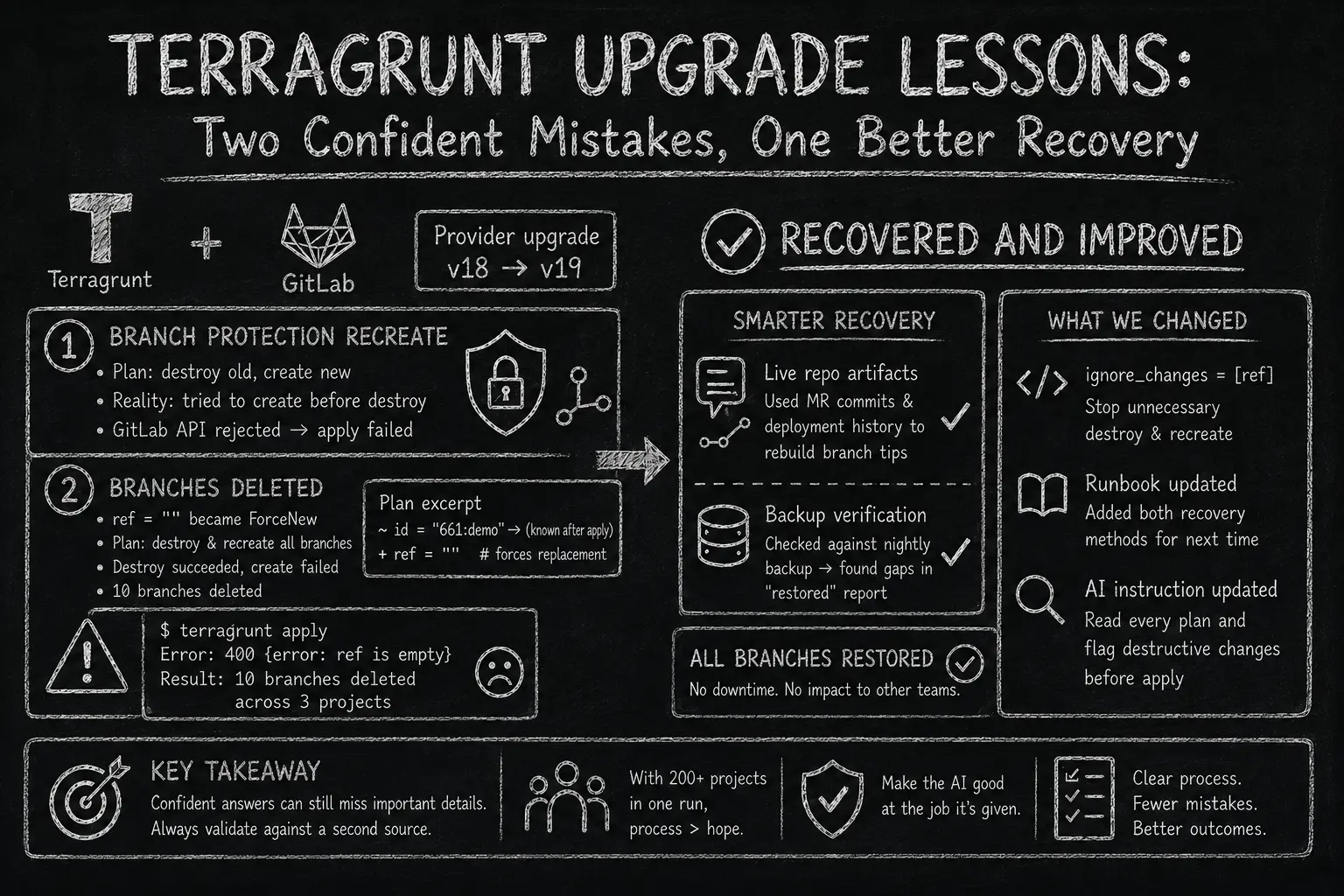
We manage a self-hosted GitLab instance entirely through Terraform: groups, projects, branch protection, and even git branches. All of it lives in one shared module and gets applied with Terragrunt. We upgraded that module’s provider from v18 to v19. The whole thing took about two or three hours. In that time, an AI assistant sounded confident twice about things that were not fully correct. I caught only one of the two mistakes in time, and only because checking a confident answer against something else was already a habit for me, not because I noticed a problem first.
The migration
GitLab provider v19 had many breaking changes. One mattered most for us: the gitlab_branch_protection resource changed to use separate attributes for CE and EE licenses. This broke any config that did not match the new format. We started the upgrade after a terraform plan failure that kept happening now and then on one project’s branch protection. We expected a normal breaking-change migration.
First call: “it’s just config, let it recreate”
While researching the upgrade, the AI found and read the module’s own migration notes. They said clearly that the CE/EE change could not be auto-migrated with Terraform’s moved blocks. Without a manual terraform state mv, plan would destroy the old resource and create a new one.
The AI told me this while explaining a moved-block error. It was correct, but it sounded like background information, not a warning. I read the plan output myself. I decided branch protection is just config, not code, so I accepted the risk of letting Terraform destroy and recreate it. That was my own decision. I did not miss anything here.
What neither of us expected was how the recreate would actually run. On some projects, it tried to create the new branch-protection resource before destroying the old one for the same branch. GitLab rejected the new config while the old one still existed, so the apply failed on those projects. A pipeline re-run fixed it.
Deciding to accept this risk made sense. Recreating branch protection is a fine trade-off in theory. What actually caused problems was one small, unchecked detail: how the recreate would run in practice. That detail did not show up in the plan output or in the migration notes. It only showed up once we saw how each project’s apply actually ran.
Second call: “8 for 8, restored”
Still in the same pipeline run, we hit a second, unrelated failure. gitlab_branch had a ref argument. Our module always set it to ref = "" on every branch block. In older provider versions, this field did nothing once the branch existed. Provider v19 changed ref into a field that forces replacement. The next plan looked at every branch, saw that ref needed a value, and planned to destroy and recreate all of them:
~ id  = "661:demo" -> (known after apply)
+ ref = "" # forces replacement
The provider’s own docs already warned about this, and had done so since version 18.1.0, one full major version before the one we were on:
The ref attribute is only set in state on resource creation. Imports or divergent branches can lead Terraform to destroy and recreate the resource. Use the lifecycle meta-argument to ignore changes to avoid this behavior.
Nobody, me or the AI, had read that page before it mattered. The warning had been sitting there since v18.1.0, but until then it cost us nothing: ref was not a force-replacement field yet, so nothing broke and nobody had a reason to go read it. It only started to matter the moment we moved to v19.
The destroy step worked. The recreate step failed, because GitLab’s API rejects an empty ref with a plain 400 {error: ref is empty}. Ten branches across three projects got deleted in that one apply. Eight of them were on the main app repository, where people were actively working that same afternoon.
In a strange way, that failure was the lucky part. If GitLab’s API had accepted the empty ref and just picked some default branch to create from, the apply would have gone green and we might not have noticed anything was wrong for a long time.
My first idea was to use the org’s disaster-recovery runbook. But it only covered a full restore of the whole instance: the entire database and every repository, rolled back to last night’s backup. That would have worked, but it also meant downtime and rolling back every other team’s work, just to fix eight branches on one project. We did not use it.
Instead, the AI built a smaller, better fix. GitLab keeps merge-request refs and CI deployment refs pointing at commits for weeks, even after the branch ref is gone. It does not delete the actual git objects that fast either. So the AI used merge-commit messages and deployment history to rebuild the last known tip of each deleted branch, then pushed those refs back directly. No downtime, and no effect on any other project. It reported all eight branches restored, and confirmed this with git ls-remote. Two more branches on smaller, related projects got the same treatment. One was truly recovered. One was marked as “never existed,” since nothing in the live repository pointed to it anymore.
If I had stopped there, that would have been the whole story. Just to be careful, not because anything looked wrong, I pulled the real nightly backup and checked every “restored” branch against it myself. That one check changed two of the conclusions.
Three of the eight “restored” branches were pointing at old commits, not the newest ones. The rebuild method could only use references that still existed. In three cases, later CI activity had moved those branches further than the rebuild could see. The recovery was not wrong, just incomplete, and “incomplete” had been reported as “done.”
The branch marked as “never existed” actually had real commit and tag history in the backup. The search of the live repository was careful and found nothing, simply because nothing in the live repo pointed to it anymore. No evidence in one place does not mean there is no evidence at all.
Both mistakes were only found by checking against a second, separate source. The AI did not seem unsure about its own report. It was fully confident and still wrong. Its own method could not show it the mistake.
Same afternoon, same pattern
Two different failures, in the same pipeline, within a couple of hours. Neither one was carelessness. The decision to let branch protection recreate was reasonable. The recovery method for the deleted branches was good engineering. In both cases, what I saw was correct as far as it went, a plan summary, a “restored” report. But each one still missed a detail. I only found that detail by checking it against something else: the real per-project apply results, and the real nightly backup. Both the plan and the report sounded confident. Confident is not the same as complete.
What we changed
- Added a
lifecycle { ignore_changes = [ref] }block to the branch resource, so Terraform stops planning a destroy and recreate over a field we never meant to change after creation. - Added both recovery methods, the live-repo ref rebuild and the targeted backup extraction, to our existing runbook. The next person will not need to work this out from scratch.
- Gave the AI a clear, standing instruction: read every plan, and call out anything dangerous, like a deletion or a forced recreate, before anyone applies it. Our pipeline touches 200+ projects in one run. No human can read every plan line by line, so this cannot depend on someone happening to notice.
Takeaway
The point here is not to trust AI less. It is to make it better at the part it is supposed to help with. With a pipeline that touches 200+ projects, no human can check every plan by hand. What actually scales is giving the AI a clear job: read every plan, and flag anything destructive before it runs. That is a process we can build and test, not a habit we have to hope someone remembers.