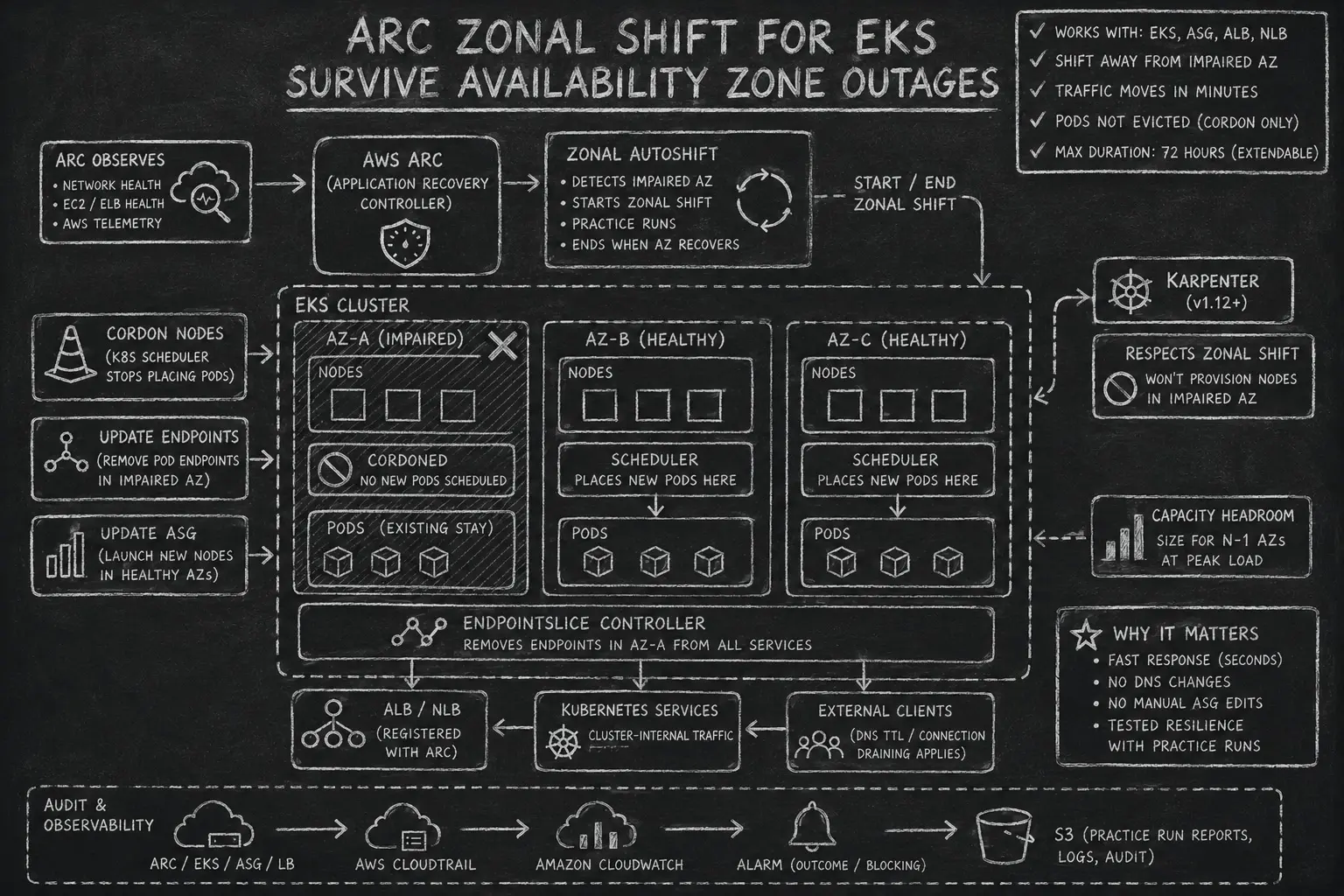
Earlier this year, AWS had a major Availability Zone outage in us-east-1. Only one AZ went down, but if your workloads were running there, you know how it went: alerts firing, runbooks open, manual fixes, and a race to move traffic before customers noticed. For those who were not lucky enough to be in a different AZ, it raised an obvious question: why isn’t there a button for this?
There is. It’s called ARC Zonal Shift.
What Is ARC Zonal Shift?
Amazon Application Recovery Controller (ARC) is an AWS service for coordinating recovery across Availability Zones. Its Zonal Shift capability lets you move traffic for a supported resource away from a specific AZ quickly. No DNS record changes, no manual ASG edits, no draining nodes by hand. ARC works at the load balancer and EndpointSlice level, so the shift starts in seconds, though existing connections finish draining on their own.
For EKS specifically, it means: one command (or zero commands, if you use autoshift) and your cluster stops sending traffic to the impaired AZ.
How It Works
When you start a zonal shift for an EKS cluster, ARC does the following automatically:
- Cordons all nodes in the impaired AZ: the Kubernetes scheduler stops placing new Pods there.
- Updates EndpointSlices: the EndpointSlice controller removes Pod endpoints in the impaired AZ from all services, so east-west traffic only goes to healthy AZs.
- Updates the Auto Scaling Group: new nodes are only launched in healthy AZs (for Managed Node Groups).
- Does NOT evict Pods: existing Pods in the impaired AZ keep running. This is intentional. When the shift expires or you cancel it, traffic is restored cleanly without a cold-start penalty.
If you’re using an ALB or NLB in front of the cluster, ARC shifts those too. Register them separately in ARC to shift ingress traffic alongside in-cluster traffic.
Traffic doesn’t move instantly. Existing connections finish naturally, and clients that have cached the load balancer’s DNS response keep connecting until their TTL expires. In practice, you’ll see traffic shift within a few minutes.
Every zonal shift has an expiry. The maximum initial duration is 72 hours, but you can extend it at any time before it expires, or cancel it early once the AZ recovers.
Wait at least 60 seconds between zonal shift operations. EKS polls for zonal state changes and may not process rapid successive shifts correctly.
Supported Resources
ARC currently supports zonal shift and zonal autoshift for:
- Amazon EKS clusters
- EC2 Auto Scaling Groups
- Application Load Balancers (cross-zone load balancing on or off)
- Network Load Balancers (cross-zone load balancing on or off)
The list is relatively short today, but AWS has been expanding it steadily. Hopefully more services like RDS, ElastiCache, and others will follow.
Manual Shift vs. Zonal Autoshift
There are two ways to use this feature.
Manual Zonal Shift
You trigger the shift yourself, via the ARC console, the AWS CLI, or Terraform.
This is the right tool when:
- You’ve identified an impaired AZ and want to act immediately.
- You’re running a planned drill (testing your cluster handles the loss of one AZ).
- You want explicit human control before traffic moves.
- You have your own monitoring and can detect a spike in latency or network errors in a specific AZ. In that case, you can build automation around the AWS CLI or API to trigger the shift faster than AWS autoshift would react.
aws arc-zonal-shift start-zonal-shift \
  --resource-identifier <cluster-arn> \
  --away-from us-east-1a \
  --expires-in 1h \
  --comment "us-east-1a degraded, shifting traffic"
Zonal Autoshift
Autoshift lets AWS trigger the shift on your behalf. AWS monitors AZ health using internal telemetry: network metrics, EC2 and ELB health signals. It automatically starts a shift when it detects a problem that could affect your workload. When the AZ recovers, AWS ends the autoshift.
Autoshift also includes practice runs: periodic automated drills that briefly shift traffic away from one AZ to verify your cluster can handle it. Practice runs are how you catch pre-scaling gaps before a real incident does.
Practice runs require at least one CloudWatch outcome alarm for every resource you register, including load balancers. This alarm should monitor your application health during the 30-minute practice window. If the alarm fires, ARC marks the practice run as failed and stops it. Without a configured alarm, you cannot enable practice runs, and without practice runs, autoshift will not work. You can also configure optional blocking alarms that prevent a practice run from starting when something is already broken in your environment.
For most production clusters, autoshift is the right default. You get a faster response than a human-triggered shift (no one needs to be paged and acknowledge first), and the practice runs give you ongoing confidence that the setup actually works.
Autoshift only makes sense if your cluster is already pre-scaled to absorb the loss of one AZ. If your nodes are running at capacity, shifting an AZ just moves the problem: you’ll hit resource pressure in the remaining AZs. Size your node groups to handle n-1 AZs at peak load.
Karpenter Support
Karpenter gained native ARC zonal shift support in version 1.12. When a zonal shift is active and the feature is enabled, Karpenter won’t provision new nodes in the impaired AZ. This works whether the shift was triggered manually or via autoshift.
Two things to check: you’re on Karpenter v1.12+, and settings.enableZonalShift: true is set in your Helm values (it’s off by default). Without it, Karpenter will keep scheduling nodes into the AZ you’re trying to evacuate.
Prerequisites
Before enabling zonal shift, make sure your cluster is actually ready to survive the loss of one AZ:
- Multi-AZ node groups: nodes spread across at least 3 AZs.
- Capacity headroom: size for
n-1AZs at peak. If you’re tight on capacity, consider over-provisioning with low-priority pause Pods. - Pod replicas spread across AZs: use
topologySpreadConstraintsso workloads have replicas in every AZ. - CoreDNS spread: the EKS CoreDNS add-on handles this by default; verify it if you manage CoreDNS yourself.
- Stateful workload assessment: EBS volumes are AZ-bound. Pods backed by EBS cannot be rescheduled into a different AZ during a shift. Plan accordingly (see Caveats).
# Spread pods evenly across AZs
topologySpreadConstraints:
  - maxSkew: 1
    topologyKey: topology.kubernetes.io/zone
    whenUnsatisfiable: ScheduleAnyway
    labelSelector:
      matchLabels:
        app: my-app
Terraform Setup
Enable Zonal Shift on the EKS Cluster
With terraform-aws-eks
v21+, enabling zonal shift is a single config block:
module "eks" {
  source  = "terraform-aws-modules/eks/aws"
  version = "~> 21.0"

  cluster_name    = "my-cluster"
  cluster_version = "1.35"

  vpc_id     = module.vpc.vpc_id
  subnet_ids = module.vpc.private_subnets

  # Enable ARC Zonal Shift registration
  zonal_shift_config = {
    enabled = true
  }

  # ... rest of your cluster config
}
This registers the cluster with ARC. The cluster will appear as a managed resource in the ARC console, but no shifts are active yet.
Configure Zonal Autoshift
Autoshift is configured separately on the ARC side, using the aws_arc_zonal_shift_managed_resource resource:
resource "aws_arc_zonal_shift_managed_resource" "eks" {
  resource_identifier = module.eks.cluster_arn
}
To enable autoshift with practice runs:
resource "aws_arc_zonal_shift_zonal_autoshift_configuration" "eks" {
  resource_identifier = module.eks.cluster_arn

  autoshift_observer_notification_status = "ENABLED"

  zonal_autoshift_status = "ENABLED"

  practice_run_configuration {
    # At least one outcome alarm is required
    outcome_alarms {
      alarm_identifier {
        name   = aws_cloudwatch_metric_alarm.app_health.alarm_name
        region = "us-east-1"
      }
      type = "CLOUDWATCH"
    }

    # Block practice runs during business-critical windows
    blocked_windows = [
      "MON:09:00-MON:10:00",
      "FRI:17:00-FRI:18:00",
    ]
  }
}
Karpenter
The karpenter submodule from terraform-aws-eks only creates the required AWS resources: IAM roles, SQS queue, and EventBridge rules. Karpenter itself is installed separately, typically via Helm.
Zonal shift support is available in Karpenter v1.12+, but it is disabled by default. You need to enable it explicitly via the settings.enableZonalShift Helm value:
settings:
  enableZonalShift: true
Once enabled, Karpenter will not provision new nodes in an AZ that has an active zonal shift. Make sure your NodePool spans multiple AZs so Karpenter has healthy zones to provision into:
# NodePool: Karpenter will respect zonal shift automatically
apiVersion: karpenter.sh/v1
kind: NodePool
metadata:
  name: default
spec:
  template:
    spec:
      requirements:
        - key: topology.kubernetes.io/zone
          operator: In
          values: ["us-east-1a", "us-east-1b", "us-east-1c"]
        - key: karpenter.sh/capacity-type
          operator: In
          values: ["on-demand"]
Register Load Balancers
If you have ALBs or NLBs in front of the cluster, register them with ARC too so ingress traffic shifts alongside in-cluster traffic:
resource "aws_arc_zonal_shift_managed_resource" "alb" {
  resource_identifier = aws_lb.main.arn
}

resource "aws_arc_zonal_shift_zonal_autoshift_configuration" "alb" {
  resource_identifier = aws_lb.main.arn

  zonal_autoshift_status = "ENABLED"

  practice_run_configuration {
    # Outcome alarm is required for all resources, including load balancers
    outcome_alarms {
      alarm_identifier {
        name   = aws_cloudwatch_metric_alarm.app_health.alarm_name
        region = "us-east-1"
      }
      type = "CLOUDWATCH"
    }

    blocked_windows = [
      "MON:09:00-MON:10:00",
    ]
  }
}
Caveats
StatefulSets and EBS volumes: EBS volumes are zone-locked. When a zonal shift cordons nodes in AZ-A, Pods backed by EBS volumes in AZ-A stay stuck. They can’t attach to a node in AZ-B or AZ-C. This is the most common gap teams discover during a drill. Options: use EFS instead (multi-AZ), replicate data at the application level, or accept that those workloads won’t shift.
EKS Auto Mode: not supported. If you’re using Auto Mode, zonal shift is not available.
Fargate: not supported. Fargate has its own AZ-awareness behavior but it’s not the same thing.
Pods are not evicted: nodes are cordoned, not drained. This is a feature (fast rollback), but it means workloads in the shifted AZ keep consuming resources. Plan for this if you’re tight on capacity.
Load balancer fail-open state: if an NLB or ALB is in a fail-open state (all targets unhealthy), a zonal shift has no effect. The load balancer is already routing traffic everywhere it can.
Cross-zone load balancing interaction: if multiple load balancers forward to the same targets, a zonal shift on one cross-zone-enabled LB drops target capacity for all of them.
Conclusion
ARC Zonal Shift is one of those features that should be enabled by default for any production EKS cluster running in multi-AZ. The cost is zero, the setup is a few lines of Terraform. Manually fixing traffic routing during an AZ incident at 3am is not a good time.
Enable it, configure autoshift with practice runs, and let the drills surface any pre-scaling gaps before a real outage does.