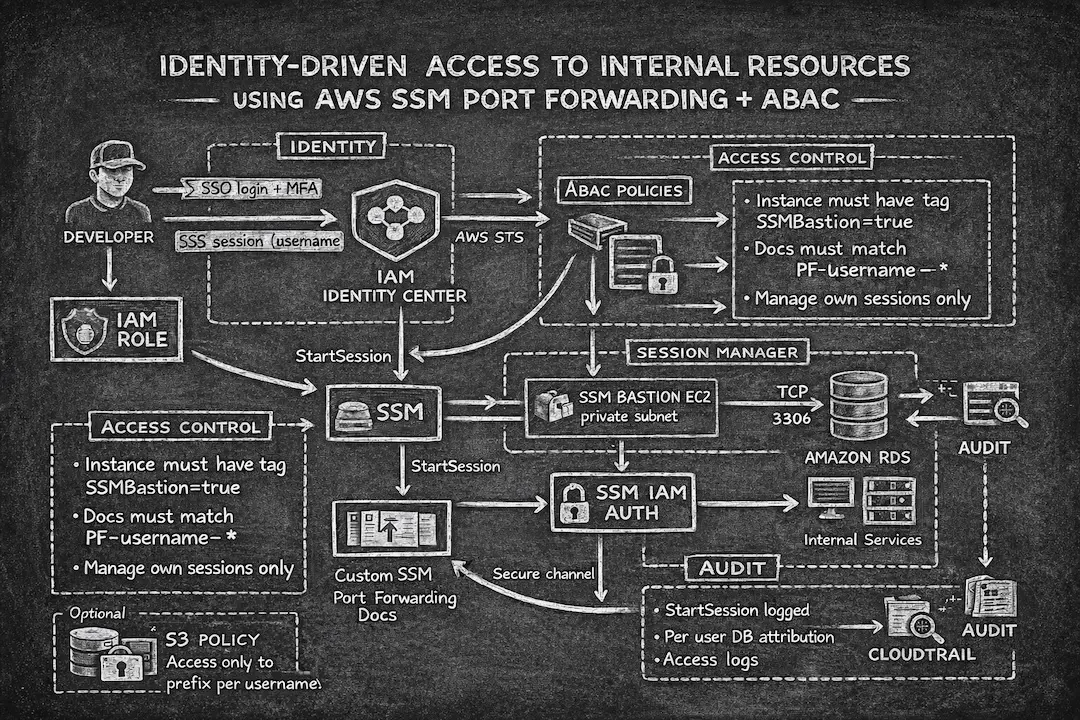
Identity-Driven Access to Internal Resources Using AWS SSM Port Forwarding and ABAC
Traditional access to private AWS infrastructure usually relies on VPN connectivity and direct subnet reachability. It works, but it also increases attack surface, enables lateral movement, and makes auditing harder.
This article describes a different approach:
An identity-driven, zero-trust access model built on:
- AWS IAM Identity Center (SSO + MFA)
(Optional) - AWS Systems Manager Session Manager port forwarding
- Attribute-Based Access Control (ABAC)
No direct subnet access. No shared passwords. No SSH key distribution.
Everything is controlled by identity.
Part 2 covers a bastion shell pattern with Active Directory for PCI-scoped environments where port forwarding is not sufficient.
Overview
  flowchart TD

%% ======================
%% Identity Layer
%% ======================

subgraph Identity
    U[Developer]
    IC[IAM Identity Center]
    STS[AWS STS]
    ROLE[IAM Role with ABAC policy]
end

U -->|SSO login + MFA| IC
IC -->|
  Issue session
  with username tag| STS
STS --> ROLE

%% ======================
%% Access Control Layer
%% ======================

subgraph Access_Control
    ABAC1[
      Allow StartSession only
      if instance has tag
      SSMBastion=true
    ]
    ABAC2[
      Allow only SSM documents
      matching PF-username-*
    ]
    ABAC3[
      Allow user to manage
      only own sessions
    ]
end

ROLE -.-> ABAC1
ROLE -.-> ABAC2
ROLE -.-> ABAC3

%% ======================
%% Session Manager Layer
%% ======================

subgraph Session_Manager
    SSM[AWS Systems Manager]
    DOC[
      Custom SSM Port Forwarding
      Document
    ]
    BASTION[
      SSM Bastion EC2 in private
      subnet
    ]
end

ROLE -->|StartSession| SSM
ROLE -->|GetDocument| DOC
DOC -->|Local port forwarding only| SSM
SSM -->|Secure channel| BASTION
U <-->|Local tunnel 127.0.0.1| SSM

%% ======================
%% Private Resources
%% ======================

subgraph Private_Resources
    RDS[Amazon RDS]
    INT[Internal Services]
end

BASTION -->|TCP 3306| RDS
BASTION -->|HTTPS| INT

%% ======================
%% RDS IAM Authentication
%% ======================

ROLE -->|Generate DB auth token| RDSAUTH[RDS IAM Authentication]
RDSAUTH --> U
U -->|Connect as db user| RDS

%% ======================
%% Optional S3 ABAC
%% ======================

ROLE -->|S3 access| S3[S3 bucket]
ROLE -.-> S3POLICY[
  Access only to prefix
  per username
]

%% ======================
%% Audit
%% ======================

SSM -->|StartSession logged| CT[CloudTrail]
RDS -->|Per user DB attribution| AUDIT[Audit Trail]
S3 --> AUDIT
CT --> AUDIT
This solution introduces a unified, identity-based access model for developers and SREs to securely reach internal AWS VPC resources without relying on traditional VPN connectivity.
Instead of granting broad network-level access via VPN or routing into private subnets, engineers authenticate through IAM Identity Center and access internal services using SSM Session Manager.
Access becomes:
- Explicit
- Per-user
- Per-session
- Fully auditable
Users do not join the network. They establish tightly-scoped, IAM-authorized sessions.
Key Benefits
1. Eliminates VPN Dependency
This model can fully replace VPN-based workflows.
Instead of giving engineers full private network access, they use SSM-managed tunnels:
- No inbound connectivity required
- No client-side routing configuration
- No exposed SSH
- Access granted only via IAM authorization
VPN access becomes unnecessary for engineering tasks.
2. Zero Trust Model (Identity > Network)
Traditional VPN provides broad reachability once connected.
This introduces risk:
- Flat network access
- Shared environment exposure
- Weak audit traceability
With SSM + ABAC:
- Access is per-session
- Controlled via IAM
- Fully logged in CloudTrail
- Restricted to approved documents
The control plane is AWS-managed, not network-based.
3. Strong ABAC Enforcement
Identity Center injects session attributes such as:
aws:PrincipalTag/username
These tags drive authorization across:
- SSM session documents
- Bastion EC2 targets
- S3 prefixes
- RDS IAM users
- and many more
ABAC removes the need for per-user IAM policy management and scales cleanly.
4. Controlled Port Forwarding
Port forwarding is allowed only through approved SSM documents matching:
PF-${aws:PrincipalTag/username}-*
This ensures:
- No arbitrary documents
- No unrestricted shell sessions
- Host and port are validated
- Session behavior is centrally governed
Access is controlled at the session layer, not the network layer.
5. IAM Authentication for RDS (as an example)
Users connect to RDS using IAM database authentication.
Each user maps to:
dbuser/${aws:PrincipalTag/username}
Access granted via:
rds-db:connect
This eliminates:
- Shared passwords
- Static credentials
- Manual password rotation
Database access becomes identity-based and traceable.
6. Per-User Isolation in S3 (as an example)
The same ABAC model applies to S3.
Users are restricted to:
s3://bucket/${aws:PrincipalTag/username}/...
This provides:
- Strong per-user isolation
- No need for multiple buckets
- Clear ownership
- Automatic least privilege
7. Reduced Network Exposure
Under this architecture:
- Engineers do not access private subnets directly
- No inbound SSH
- No broad VPC routing rules
Only approved access paths are available. Lateral movement risk is dramatically reduced.
8. Auditability and Compliance
Every access path is logged:
- CloudTrail logs StartSession
- Session documents define approved paths
- RDS IAM auth provides per-user attribution
- S3 logs align with principal identity
You can answer:
- Who connected
- When
- To which resource
- Through which document
Security Controls
Restrict StartSession by Source IP
You can deny ssm:StartSession unless requests originate from approved public IPs (for example via SCP):
{
  "Effect": "Deny",
  "Action": "ssm:StartSession",
  "Resource": "*",
  "Condition": {
    "NotIpAddress": {
      "aws:SourceIp": ["123.231.234.123/32", "111.222.111.222/32"]
    }
  }
}
Enforce Session Timeouts and Logging
SSM Session Manager supports session-level controls that limit exposure and improve auditability:
- Idle timeout: Automatically terminate inactive sessions (e.g., 2 minutes)
- Max session duration: Hard limit on session length (e.g., 60 minutes)
- Session logging: Stream session output to S3 or CloudWatch Logs
These settings are configured via Session Manager preferences (AWS Console, CLI, or Terraform) and apply to all sessions in the account or region.
Operational Simplicity
This architecture removes:
- VPN provisioning
- SSH key management
- Bastion exposure
- Shared DB credentials
- Per-user IAM policy sprawl
Access is managed through:
- Identity Center groups
- Session tags
- ABAC policies
- Centralized Session Manager documents
Implementation
Replace aws:PrincipalTag/username with ${aws:userid} if you do not use SSO.
Step 1. Configure IAM Identity Center for ABAC (SSO only)
Enable session tags in Identity Center and configure user attribute mapping (Identity Center -> Settings -> Attributes for access control):
username = ${path:userName}
This becomes aws:PrincipalTag/username and drives all downstream authorization.
Example:
| |
Step 2. Create SSM Bastion Instance
Deploy a lightweight EC2 instance inside private VPC with:
- SSM Agent installed
- No inbound SSH
- Private subnet + SSM interface endpoint
(optional but recommended) - IAM instance role allowing SSM
- Tag:
SSMBastion = true
Security groups should only allow outbound traffic to required internal resources (e.g., RDS).
Step 3. Restrict StartSession to Tagged Instances
{
  "Sid": "StartSessionOnlyToTaggedBastions",
  "Effect": "Allow",
  "Action": "ssm:StartSession",
  "Resource": "arn:aws:ec2:*:*:instance/*",
  "Condition": {
    "StringEquals": {
      "ssm:resourceTag/SSMBastion": "true"
    }
  }
}
Sessions can only target approved bastion instances. You can be more specific with user policy and add account, region, etc.
Step 4. Restrict SSM Documents Per User
Enforce naming convention PF-${aws:PrincipalTag/username}-*:
{
  "Sid": "AllowOnlyPerUserSessionDocuments",
  "Effect": "Allow",
  "Action": ["ssm:StartSession", "ssm:GetDocument"],
  "Resource": "arn:aws:ssm:*:*:document/PF-${aws:PrincipalTag/username}-*"
}
Users cannot use generic AWS-StartPortForwardingSession document, only documents specifically generated for them.
Step 5. Example SSM Session Document (MySQL)
{
  "schemaVersion": "1.0",
  "description": "Port forwarding to RDS MySQL only (3306)",
  "sessionType": "Port",
  "parameters": {
    "portNumber": {
      "type": "String",
      "allowedPattern": "^3306$",
      "default": "3306"
    },
    "localPortNumber": {
      "type": "String",
      "allowedPattern": "^([0-9]{1,5})$",
      "default": "0"
    },
    "host": {
      "type": "String",
      "allowedPattern": "^rds-cluster\\.cluster-xxxx\\.us-east-1\\.rds\\.amazonaws\\.com$"
    }
  },
  "properties": {
    "type": "LocalPortForwarding",
    "portNumber": "{{ portNumber }}",
    "localPortNumber": "{{ localPortNumber }}",
    "host": "{{ host }}"
  }
}
This ensures only MySQL (3306) and only approved RDS hostname, no arbitrary hosts.
Step 6. Allow SSM Channel Permissions
Required for Session Manager:
{
  "Sid": "AllowSSMMessagesChannels",
  "Effect": "Allow",
  "Action": [
    "ssmmessages:CreateControlChannel",
    "ssmmessages:CreateDataChannel",
    "ssmmessages:OpenControlChannel",
    "ssmmessages:OpenDataChannel"
  ],
  "Resource": "*"
}
Step 7. Enforce RDS IAM Authentication
Each database user must match IAM identity:
{
  "Sid": "AllowRdsIamConnectOnlyAsOwnDbUser",
  "Effect": "Allow",
  "Action": "rds-db:connect",
  "Resource": "arn:aws:rds-db:*:123456789012:dbuser:*/${aws:PrincipalTag/username}"
}
User can only connect as their own DB user. Again, you can be more specific here and specify exact region, account, database cluster/instance
Step 8. Enforce S3 Per-User Prefix Isolation (as an example)
{
  "Sid": "S3RWOnlyOwnPrefix",
  "Effect": "Allow",
  "Action": ["s3:GetObject", "s3:PutObject", "s3:DeleteObject"],
  "Resource": [
    "arn:aws:s3:::bucket-name/${aws:PrincipalTag/username}",
    "arn:aws:s3:::bucket-name/${aws:PrincipalTag/username}/*"
  ]
}
Optional prefix-restricted listing:
{
  "Sid": "S3ListOnlyOwnPrefix",
  "Effect": "Allow",
  "Action": "s3:ListBucket",
  "Resource": "arn:aws:s3:::bucket-name",
  "Condition": {
    "StringLike": {
      "s3:prefix": [
        "${aws:PrincipalTag/username}",
        "${aws:PrincipalTag/username}/*"
      ]
    }
  }
}
Step 9. Restrict Session Lifecycle to Own Sessions
{
  "Sid": "AllowOnlyOwnSessionsLifecycle",
  "Effect": "Allow",
  "Action": ["ssm:TerminateSession", "ssm:ResumeSession"],
  "Resource": "arn:aws:ssm:*:*:session/${aws:userid}-*"
}
Users cannot terminate or resume other users’ sessions.
Example: Developer Workflow
Login
aws sso login --profile ssm-profile or aws login --profile ssm-profile
Verify credentials:
aws sts get-caller-identity --profile ssm-profile
Start Port Forwarding
aws ssm start-session --region us-east-1 --target i-xxxxxxxxxxxx --document-name PF-serhii.kaidalov-my-cluster-3306 --parameters host="my-cluster.cluster-xxxxxxxx.us-east-1.rds.amazonaws.com",portNumber="3306",localPortNumber="3306"
Keep the terminal open, this is your secure tunnel.
Connect to RDS via IAM
DB_HOST="my-cluster.cluster-xxxxxxxx.us-east-1.rds.amazonaws.com"
DB_PORT=3306
DB_USER=serhii.kaidalov
LOCAL_PORT=3306

TOKEN="$(aws rds generate-db-auth-token   --region us-east-1   --hostname "$DB_HOST"   --port "$DB_PORT"   --username "$DB_USER")"

mysql   --host 127.0.0.1   --port "$LOCAL_PORT"   --user "$DB_USER"   --password="$TOKEN"   --enable-cleartext-plugin   --ssl-mode=REQUIRED
No static credentials. No password storage.
Just-in-Time Access with Slack Integration
Managing SSM documents manually works for small teams, but as your organization grows, you may want a self-service workflow with approval gates.
SSM Just-in-Time Access is a Slack-integrated system that automates this process:
- User requests access via
/ssm-accessSlack command - Two-tier approval: security team and manager approve via Slack (using Slack user groups)
- Automatic provisioning: once approved, the system creates a time-limited SSM document with ABAC tags
- Detailed instructions: user receives connection instructions directly in Slack
- Automatic cleanup: documents expire and are removed after the configured duration
This approach adds:
- Self-service access requests
- Approval workflows with audit trail
- Time-bound access (e.g., 14 days)
- No manual IAM or SSM document management
The system integrates with IAM Identity Center and relies on Slack user groups for approver management (requires a paid Slack plan).
Repo URL: https://github.com/Perun-Engineering/ssm-just-in-time-access
Conclusion
This model replaces traditional network-based access with identity-driven authorization.
Instead of asking:
“Are you on the VPN?”
We ask:
“Are you authorized for this specific resource, through this approved document, right now?”
By combining:
- IAM Identity Center for centralized authentication
- SSM Session Manager for secure tunneling without exposed ports
- ABAC policies for scalable, tag-based authorization
- IAM database authentication for credential-free RDS access
- Just-in-time provisioning for time-bound, auditable access
You get:
- A true zero-trust access model
- Full audit trail in CloudTrail
- No VPN, no SSH keys, no shared credentials
- Automatic least privilege via session tags
It is not only more secure, it is also operationally simpler.
And simplicity is one of the strongest forms of security.